
Artificial intelligence is reshaping nearly every part of how we work. According to the McKinsey Global Institute (MGI), 60% of work activities across industries are technically automatable with today’s AI and automation technologies. But MGI also emphasizes a critical distinction: tasks that rely on human judgment, emotional understanding, complex communication, and creative decision-making remain extremely difficult for AI to replicate.
This dual reality defines the future of UX (user experience) design. While AI tools can automate workflows, analyze usage patterns, generate wireframes, and speed up iterative tasks, the heart of UX design remains human-centered. Products are built for people not for algorithms and understanding human behavior requires skills far beyond what AI can fully grasp.
As AI becomes more capable, the value of empathetic, strategic, and insight-driven UX designers only increases. The designers who master these uniquely human competencies will not only stay relevant in 2026, they will become even more essential to product teams, innovation efforts, and customer-centric organizations.
In this article, we will explore the five UX skills that AI cannot replace, why these capabilities remain human, and how designers can strengthen them to stay ahead in an AI era.
Will AI Replace UX Designer?
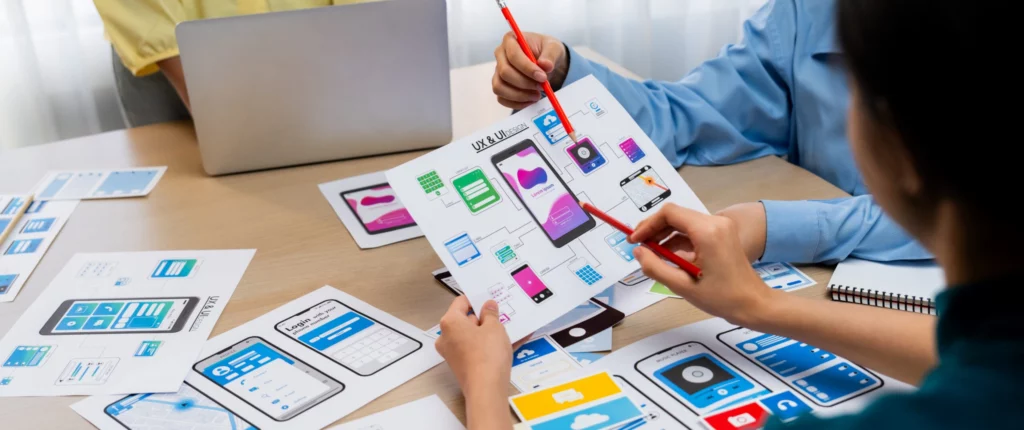
AI will not replace UX designers, but it will significantly reshape the role. While AI can automate tasks such as wireframe generation, layout suggestions, data analysis, and even content drafts, it still lacks the emotional, contextual, and strategic intelligence required for meaningful UX work. According to the McKinsey Global Institute, tasks involving human empathy, judgment, and complex communication remain extremely difficult for AI to replicate, even as automation dramatically accelerates production tasks.
Similarly, the Nielsen Norman Group (NN/g) emphasizes that AI cannot understand unspoken needs, cultural nuances, or the emotional responses that define real user behavior. UX design is fundamentally about people like their motivations, fears, expectations, and mental models and AI cannot independently interpret or advocate for these human experiences.
Instead of replacing designers, AI will elevate expectations for UX professionals. Designers will spend less time on mechanical tasks and more time on strategic decision-making, ethical evaluation, and human-centered insight. In this future, AI becomes an assistant but the designer remains the architect. UX roles will not disappear; they will become more valuable to organizations striving to build technology that truly connects with people.
1.Evaluating Whether a Problem Is Worth Solving
Before any design work begins, UX designers must decide whether an idea is worth pursuing. Product ideas come from everywhere founders, product managers, engineers, or enthusiastic stakeholders but not every idea deserves time, resources, or user attention. This involves examining real user needs, business goals, market demand, and available resources.
AI can analyze data and identify trends, but it cannot understand deeper context such as:
- team constraints
- company politics
- long-term vision
- timing and feasibility
Only humans understand the nuances behind constraints, team morale, organizational politics, timing, and long-term product vision. UX designers combine intuition, domain knowledge, and cross-functional insight to determine whether a problem is worth pursuing.
This level of judgement prevents wasted development cycles, misaligned features, and solutions that fail to resonate with users. In environments with competing priorities and changing business goals, human decision-making remains essential. UX designers play a critical role in determining which problems truly matter and ensuring the team focuses on building the right things, not just building more things.
2. Storytelling and Communicating With Stakeholders
Design is rarely done in isolation. Most products need approval, buy-in, or collaboration across product managers, developers, business leads, marketing, and even executives. That’s why UX often involves storytelling, persuasion, and stakeholder management.
Designers don’t just deliver UI screens but they craft narratives that show why a feature matters, how it solves a problem, and why it’s worth building now. They negotiate trade-offs, balance conflicting agendas, and adapt on the fly. AI can generate slides, layout ideas, or even help polish a presentation. But:
- It doesn’t read the room.
- It doesn’t sense team politics or corporate culture.
- It can’t handle unexpected objections with empathy and reason.
In other words: communication, persuasion, and human-to-human understanding remain firmly outside AI’s domain. That makes stakeholder-level UX work such as pitching ideas, aligning teams, managing trade-offs much more secure than tasks AI can automate.
3. Conducting Human-Centred User Research
Designing a good user experience requires real insight into human behavior. That often comes not from data alone but from user interviews, observation, empathy, and reading subtle cues: facial expressions, hesitation, tone, body language. AI can analyze survey data, process quantitative user metrics, or generate personas based on demographics. But it cannot:
- Truly empathize with users
- Interpret non-verbal signals or unstated discomfort
- Understand cultural context, emotional nuance, or hidden needs
- Balance contradictory feedback with real-world constraints
Human empathy allows designers to uncover hidden needs and design meaningful, emotionally resonant experiences. As long as products serve humans, human-centered research will remain essential.
4. Providing Strategic Vision Amid Product Changes
Design is also about shaping where the product should go next. This requires strategic vision, a human skill that blends market understanding, business context, design thinking, and team dynamics. AI can collect information about competitors, trends, and user behavior, but strategy is never fixed. Products constantly evolve due to:
- changing user expectations
- shifting business goals
- technical limits
- team bandwidth
- timeline adjustments
- real-time user feedback
Only humans can interpret these moving parts, deal with uncertainty, and guide the product toward the right direction. This is why strategic UX work like planning roadmaps, setting priorities, aligning visions, and coordinating across teams, is a skill that stays deeply human and cannot be replaced by AI.
5. Navigating Legacy Systems and Complex Product Environments
Many companies don’t build products from scratch. They inherit complex legacy systems built over years such as old code, outdated frameworks, inconsistent UI components, technical debt, and accumulated patches. Integrating new features into such systems often requires deep understanding, subtle judgment, and careful balance between “new vs old.”
AI tools excel at generating wireframes, UI components, or fresh layouts but they struggle to:
- Understand historical context or past decisions
- Respect old integrations, dependencies, backward compatibility
- Balance new requirements with existing constraints
- Maintain consistency across a messy, layered product architecture
For many established products, this makes maintenance, refactoring, and incremental design improvements a human job. Experienced UX designers who can navigate legacy complexity, bridge old systems with new demands, and understand trade-offs will remain in demand.
Why UX Designers Should Utilize AI Tools
This is not a call to reject AI. In fact, AI is becoming an essential part of modern UX practice. When used effectively, AI tools can make many aspects of UX work faster, more accurate, and significantly more efficient. For example, AI can assist with:
- Automating repetitive or time-consuming tasks, such as layout generation, asset exports, or style updates
- Accelerating early-stage design work, including wireframes, mockups, and interface variations
- Generating idea drafts, design alternatives, or visual references
- Processing large data sets, analyzing user metrics, and identifying behavioral patterns
By offloading this operational workload to AI, UX designers gain more time and cognitive bandwidth to focus on the skills that truly require human intelligence: problem framing, emotional understanding, stakeholder communication, creative exploration, and strategic decision-making.
In this model, AI functions as a design assistant, taking on mechanical tasks and surface-level production work. The UX designer remains the architect, the one who defines the vision, interprets human needs, makes ethical decisions, and shapes the overall product direction. AI enhances the workflow, but it does not replace the human expertise that gives design meaning and impact.
How UX Designers Can Leverage AI to Create Better User Experiences
The rise of AI doesn’t diminish the role of UX designers; rather, it expands their toolkit and accelerates what’s possible. When used strategically, AI can help designers make smarter decisions, work more efficiently, and build more meaningful products. The key is not to let AI replace core human skills, but to use it as a multiplier for creativity, insight, and strategic thinking.
Here are practical ways UX designers can leverage AI to enhance their work and create better user experiences:
Speed up early exploration and ideation
AI can generate wireframes, layout variations, and design references within seconds, helping designers explore more ideas with significantly less manual effort. Tools such as Uizard (auto-generates wireframes and mockups), Galileo AI (creates UI screens from natural language prompts), and Figma AI (built-in features that generate design variations and assist with layout decisions) allow designers to accelerate early-stage ideation while maintaining full creative control.
Automate repetitive or time-consuming tasks
Tasks like asset exports, style updates, formatting, and content adaptation can be offloaded to AI tools so designers can stay focused on higher-level decisions. Tools such as Adobe Firefly and Visily AI can handle asset exports, style adjustments, visual generation, and layout clean-up, freeing designers to focus on conceptual and strategic tasks rather than production work.
Enhance research and insight generation
AI-powered platforms like Dovetail AI, UserTesting Insight AI, and Notion AI can summarize interview transcripts, highlight recurring themes, identify behavior patterns, and process large data sets in minutes. This accelerates insight generation while leaving interpretation, prioritization, and contextual judgment to human designers.
Support content design and UX writing
Tools such as ChatGPT, Writer.com, and Jasper AI with drafting microcopy, generating tone variations, and producing content suggestions. Designers then refine and adapt these outputs to match user needs, brand voice, and contextual understanding, areas where human judgment remains essential.
Provide data-driven decision guidance
AI supports rapid prototyping and data-driven decision-making. Platforms such as Framer AI, Amplitude AI, and Mixpanel Signal AI make it possible to generate interactive prototypes quickly, automate usability test analysis, and surface actionable behavioral insights, all of which help designers validate ideas earlier and optimize experiences based on real evidence.
By treating AI as a design assistant rather than a replacement, UX designers retain control over the vision, the decisions, and the human experience while gaining the speed, accuracy, and efficiency that AI provides. Designers who learn to integrate AI into their workflows will move faster, uncover deeper insights, and create products that better reflect users’ needs.
In the AI era, the most valuable UX designers will be those who combine human empathy and creativity with AI-driven efficiency and intelligence.
Partner With Flow Digital To Enhance Your UX Strategy
AI is transforming the design landscape but it is not replacing the essence of UX. The future belongs to designers and businesses that can combine human strengths such as empathy, judgment, creativity, communication, and strategic thinking with the speed and intelligence of AI-powered tools. This blend is what enables teams to create experiences that are efficient, intuitive, and deeply human.
If your business is ready to adapt to this new era to build user-centric products and enhance your web design experience, Flow Digital is here to support you. We specialise in UX & UI design, AI-ready product development, and strategic digital transformation that helps organisations thrive in an AI-driven world.
Reach out to the Flow Digital team today to future-proof your user experience and create products that truly connect with people intelligently, ethically, and effectively.