

Most Odoo conversations we have with Malaysian business owners start the same way. The company already runs sales, stock and invoicing in Odoo, but several teams still work around the system. Sales staff call customers from their personal phones, project managers rebuild timesheets from memory on Friday afternoon, and the finance team re-keys supplier bills that arrived as PDFs.
Odoo 20 targets many of those workarounds directly. This release is less about a new look and more about putting AI, telephony and automation inside the apps that SMEs already use every day, while keeping the interface familiar to anyone coming from version 19.
We covered the early signals in our Odoo 20 preview. This article is the full launch list, organised app by app, so you can see what changed in the areas your business relies on. We have also added what we think each change means in practice, based on the Odoo implementations and upgrades we run for Malaysian SMEs, and closed with realistic upgrade costs and timelines for this market.
What Odoo 20 gets right
Before going through the list, it is worth being clear about what makes this release strong, because it shapes how you should plan an upgrade.
- AI is part of the apps, not bolted on. The assistant opens inside whichever record you are working on, and its answers appear as normal Odoo views that you can filter and drill into. That matters because a chart you can audit is far more useful to a manager than a paragraph of generated text.
- AI is included in the subscription. Odoo is not charging a separate per-user AI fee, which removes one of the biggest cost surprises we see when SMEs compare business software.
- The interface is refined rather than rebuilt. Teams trained on version 19 will recognise every screen, so retraining effort is modest compared with earlier major releases.
- Automation now reaches the everyday tasks. Timesheets, supplier bills and call logging are exactly the jobs staff skip when they are busy, and Odoo 20 takes most of the typing out of them.
The honest caveat is that many features were demonstrated with European localisations. Anything that touches banks, payroll, tax or telephony needs to be checked against the Malaysian localisation before you commit to it.
AI features in Odoo 20: assistant, agents and MCP
AI is the centrepiece of Odoo 20, and it appears in three forms that suit different kinds of work.
- A context-aware assistant in every app. Click the AI icon and ask a question by typing or by voice. It knows which record you are on, so a request such as “forecast my opportunities by month” or “show sales by product category” opens a real pivot or graph view that you can adjust.
- It understands your customisations. The assistant reads the structure of your database, including custom modules and fields. For businesses with a tailored Odoo, which is most of the ones we work with, this is the difference between a demo feature and a useful one.
- Permission before action. The AI asks before it creates or changes records, or enables anything risky such as custom scripts on your website. Past AI sessions are saved so staff can return to an analysis later.
- Background agents in the new AI app. An agent combines instructions, skills (such as web search, image generation or updating records), knowledge from your documents, and triggers based on dates or field changes. You describe the goal in plain language, for example “prioritise and assign help desk tickets”, and the agent asks clarifying questions before configuring itself.
- An MCP server for outside AI tools. Model Context Protocol lets external AI tools read and write Odoo data while respecting each user’s existing access rights. In practice this means a developer can connect an AI coding tool to your database and build a custom dashboard or workflow far faster than before.
In our view, agents are where Malaysian SMEs will see the quickest return, particularly for turning order emails into sales orders and routing incoming leads, which are tasks that currently depend on one person remembering to do them.
Sales and CRM: leads, phone calls and quotations
The sales side of Odoo 20 covers the whole path from finding a lead to sending a quotation the customer is happy to sign.
- A lead generation hub. Leads can come from a search of Odoo’s company database filtered by country, industry and size, from website visitors identified by their company network, from imports, from Outlook, or from a business card photographed on a phone.
- AI pipeline analysis you can check. Ask for a revenue forecast or a count of new leads per month, then click into the result to see which opportunities it includes. Sales managers can finally answer “why is next month low?” without exporting to a spreadsheet.
- Gmail and Outlook plug-ins. Staff can log emails and attachments to Odoo, search contacts and opportunities, and create records without leaving their inbox.
- Odoo Phone, a built-in VoIP system. Business numbers can be bought inside Odoo and assigned to each salesperson, with click-to-call from any lead, a floating call window, call transfer, recording and automatic transcripts. A drag-and-drop call flow designer handles menus, opening hours and routing to teams.
- Reusable quotation sections. A section such as “conference room package” can be saved as a template and dropped into any quote, and a quantity set on the section scales every line inside it.
- Margin-based pricing on quote lines. Each line shows its cost and margin, and typing a target margin recalculates the selling price. Quotes can also switch between tax-inclusive and tax-exclusive pricing in one click, and order lines can carry product images.
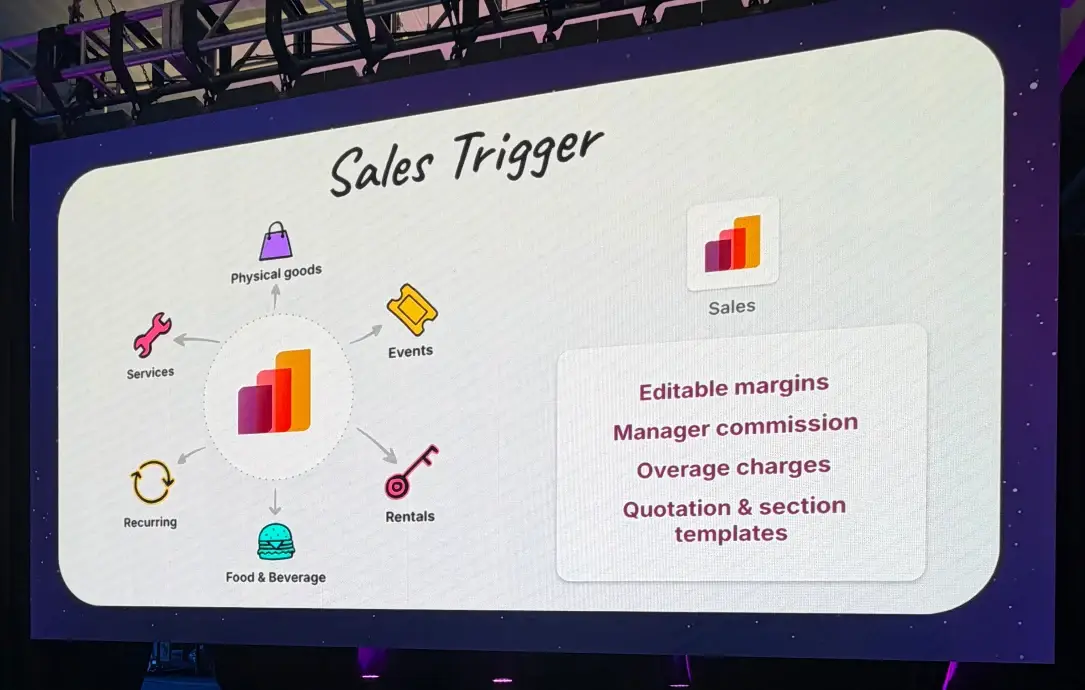
- Commission and overage charges. Odoo’s sales roadmap also lists manager commission and overage charges alongside editable margins, which matters for businesses that sell services, rentals, events or recurring plans from the same Sales app.
For the project-based businesses we support, such as renovation, furniture and engineering firms, reusable sections and live margins will save more time than any other sales change in this release. Check which countries Odoo Phone offers numbers in before planning around it, since Malaysian coverage should be confirmed.
Website and eCommerce
The website builder can now produce a complete branded site from a few choices, and the shop gains features that directly help conversion.
- AI site generation. Choose a business type and a brand positioning, such as eco-friendly or premium, and Odoo proposes a colour palette and several finished site designs with copy and images already in place.
- An AI helper on every block. Ask for a change in plain language, for example a count-up animation on key figures or a full new page with a cover, team section and FAQ, and the assistant builds it.
- Automatic design corrections. Text over photos gets a shadow for contrast, and decorative section shapes adopt the colour of the next block, so pages stay tidy without design skills.
- AI product photos. A plain product image can be restaged in a realistic setting, such as an office or living room, and used as the main shop image.
- Better search and variants. Searching for a colour or material now finds products whose variants match, and variant thumbnails appear on the product page.
- A customisable cart and click and collect. Upsell or donation blocks can be dragged into the cart, and customers collecting in store see live stock and choose a pickup date.
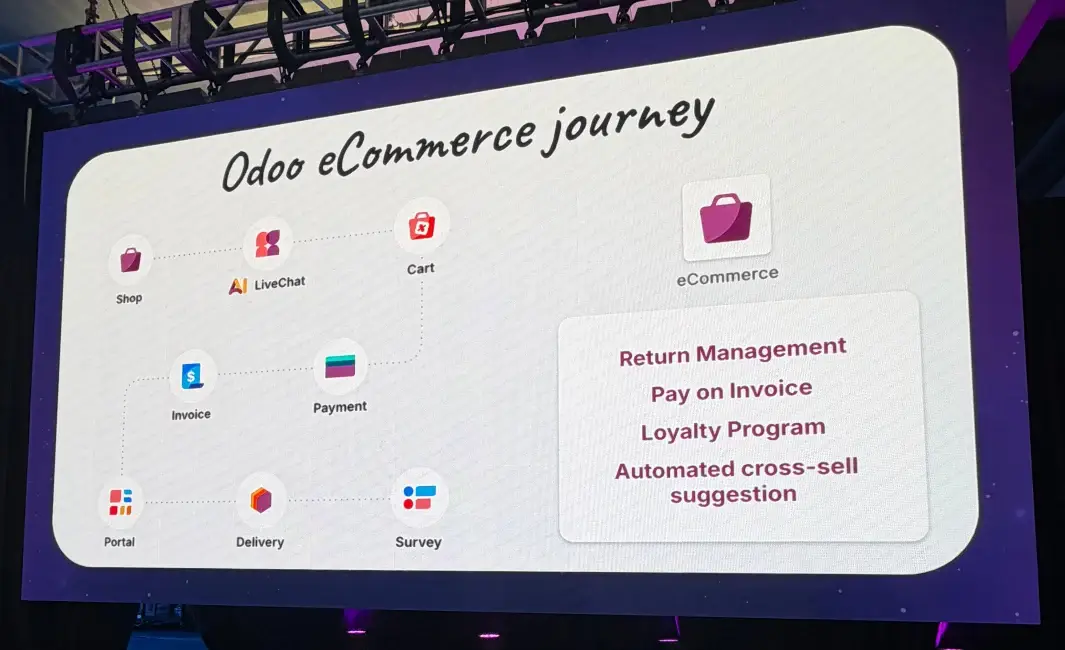
- Returns, pay on invoice and loyalty. The eCommerce journey in Odoo 20 adds return management, a pay-on-invoice option for trusted B2B buyers, loyalty programmes and automated cross-sell suggestions, with AI live chat sitting between the shop and the cart.
The SEO tools, translation, visitor analytics and free hosting from earlier versions continue. For a small retailer, the AI product photo feature alone can lift the quality of a catalogue that was previously shot on a phone.
Projects, timesheets and HR
This part of Odoo 20 focuses on the time and people records that staff tend to leave until the last minute.
- Projects built from documents. Attach a project brief as a PDF and the AI creates the project and its tasks with short summaries, after checking for duplicates and asking permission.
- A cost overview per project. Estimated and actual figures sit side by side, covering what has been sold, delivered and invoiced, supplier costs and margin, and the site address opens on a map.
- A timesheet widget everywhere. Time can be logged from any record, including a task or a sales order, and the widget remembers which project you were working on.
- A local timesheet assistant. An optional tracker runs on the employee’s own computer, sends nothing to Odoo, and suggests timesheet entries from the day’s activity. The employee accepts, merges or discards each suggestion.
- Weekly reminders and team approval. Staff see logged hours against expected hours, and managers approve the whole team’s timesheets in one click, which updates the sales orders used for invoicing.
- Self-service hiring and onboarding. Candidates can adjust their own salary package through a link and sign online, and new hires complete their onboarding details in a small personal portal. A new payroll wizard walks HR through each pay run.
Unbilled hours are one of the most common leaks we find in service businesses, so the timesheet changes are worth piloting early. The salary configurator was shown with Belgian payroll rules, so Malaysian payroll coverage, including EPF, SOCSO and PCB, should be confirmed with your implementation partner.
Inventory, purchasing and manufacturing
Operations teams get AI help with buying decisions and a simpler way to plan production.
- AI supplier analysis. Ask the assistant to review past purchases and it flags large price differences between vendors for the same item, volume discount opportunities and other savings, then drafts emails to suppliers for review.
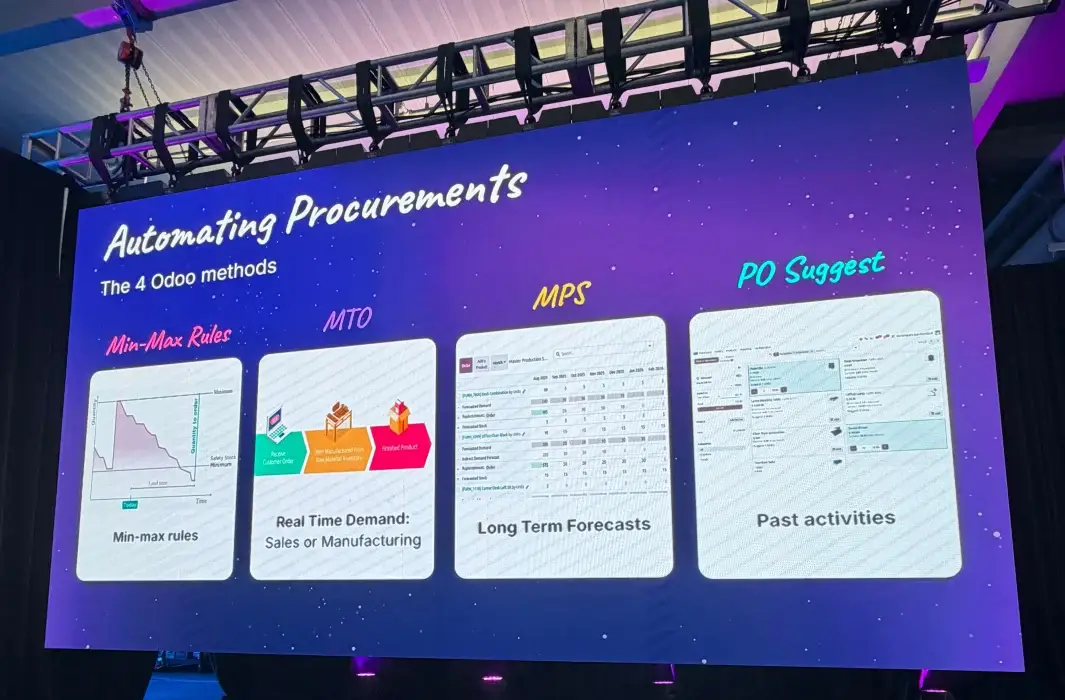
- Smarter minimum and maximum stock levels. The replenishment report suggests reorder levels from recent daily demand. You can adjust expected growth and the days of stock you want to hold, and colour warnings show when cover falls below the supplier’s lead time.
- Purchase orders match sales orders. Sections and the tax-inclusive toggle are now available on purchase orders too.
- Bill of materials comparison. Several BoMs can be compared in one pivot to see shared components, and the BoM overview shows which parts are missing or have no supplier for a given quantity and date.
- Priority-based production planning. Manufacturing orders are arranged by dragging them into priority order, and Odoo recalculates the schedule. This is far easier than minute-by-minute planning once there are dozens of orders.
- A barcode-driven shop floor. Workers scan their badge, scan the manufacturing order and record quantities with the scanner, without touching a mouse.
For Malaysian distributors and manufacturers, the min and max tuning addresses a problem we see constantly: reorder rules set once during implementation and never revisited as demand changes.
Accounting in Odoo 20
Accounting uses structured e-invoice data to post supplier bills with very little manual input, and adds reports that help with month-end closing.
- Bills posted automatically. When a bill arrives as a structured e-invoice and matches past behaviour, Odoo posts it straight away. Duplicates and anomalies stay in draft for review.
- Wider prediction. Odoo now predicts analytic distribution as well as accounts and tax codes, and vehicle-related bills are linked to cars in the Fleet app.
- Automatic deferrals. Service start and end dates on the invoice create deferral entries, and each expense type can use its own balance sheet account.
- Reworked assets. One asset can carry several depreciation schedules, and depreciation on an asset under construction starts with one action when it is ready.
- Built-in payment initiation. Bills can be paid from Odoo through your bank’s approval screen, with payment status and reconciliation handled automatically. Supported banks vary by country.
- New closing reports. Multi-company reports can be grouped by company, currency translation adjustments are calculated automatically, and there are new indirect cash flow and intercompany comparison reports.
- AI for finance. The assistant can summarise company health, flag missing accruals and explain month-on-month changes, drawing figures from Odoo’s own reports rather than calculating them itself.
Malaysian businesses are moving onto MyInvois e-invoicing in phases, so the structured-data approach in Odoo 20 is relevant here. Confirm how the Malaysian localisation handles MyInvois submissions and incoming bills in version 20 before relying on automatic posting. This check is part of the Odoo e-invoicing setup we do for Malaysian businesses.
Point of Sale, dashboards and the new interface
The final group covers restaurants, reporting and the look and feel of the whole system.
- Restaurant floor plan editor. Tables, decor and the floor itself can be laid out by drag and drop, with table shape, colour and seats adjusted in a few clicks.
- Bookings and service. A booking list shows dietary notes before service, tables show upcoming guests, and dishes are sorted into courses. Odoo spots items that make up a combo and offers the combo price before billing.
- Self-order and kiosk. Customers can order by table QR code or from home, choose a pickup time and pay online, and the same menu runs on a kiosk screen. Orders from delivery platforms appear alongside in-house orders.
- Spreadsheet dashboards. Dashboards are live spreadsheets, so managers can add pivots, charts and carousels themselves and drill down on any figure.
- Offline editing. Records can now be edited during an internet outage, and the changes sync once the connection returns.
- A refined interface. Screens are lighter and more rounded, content sits on white over a grey background, and small animations make navigation feel quicker. The Discuss app has been reorganised, with polls in channels and instant meetings.
For F&B operators, the self-order and combo features are the most practical additions, and they are usually the first things we switch on in an Odoo retail and POS rollout. Offline editing is a welcome safeguard for any outlet with an unreliable connection.
Planning your move to Odoo 20
A version upgrade goes smoothly when it is treated as a small project rather than a button press. This is the process we follow.
- List what you actually use. Record the apps, custom modules, reports and integrations in your current database, because each custom module needs to be migrated and tested. This inventory is the starting point of any Odoo migration.
- Match new features to real problems. Pick the two or three Odoo 20 features that remove a known workaround, such as timesheets, supplier bills or quotation templates, and plan to switch those on first.
- Check the Malaysian localisation. Confirm tax, MyInvois, payroll, banking and telephony coverage for your setup before promising anything to staff.
- Run a test upgrade. Upgrade a copy of your database, then have key users test their daily tasks on it. This is where broken custom modules and report layouts surface.
- Train on the changes only. Because the interface is familiar, short sessions on the new features are usually enough.
- Go live and review after a month. Check whether the targeted workarounds have actually disappeared, and tune the agents and reorder rules once real data is flowing.
If you would like a second opinion on your upgrade path, talk to Flow Digital on WhatsApp and we will review your current setup with you.
Upgrade now or wait?
Both choices can be right, depending on how your system is built.
- Upgrade early if you run close to standard Odoo. Businesses with few custom modules can adopt version 20 quickly and benefit from the AI and timesheet features straight away.
- Wait a few months if you are heavily customised. Allowing time for maintenance releases and for third-party modules to be updated usually costs less than fixing issues after go-live.
- Upgrade when you need the new user type. The new light user tier is only available from version 20, so a business planning to give many staff access for self-service or shop floor work has a direct reason to move.
Odoo 20 pricing, upgrade cost and timelines in Malaysia
Odoo announced that its Free and Standard plans keep their current prices, while the Custom plan rises by about 20%. It also introduced a light user priced well below a full user, covering HR self-service (leave, attendance, expenses, appraisals), point of sale, barcode, shop floor, planning, field service and the employee directory. Licence prices differ by country, so check the current Malaysian price list for exact figures.
Here is what we typically see for services in this market:
- Upgrade from a recent version with light customisation: roughly RM 5,000 to RM 20,000, usually completed in two to four weeks including testing.
- Upgrade of a heavily customised database: roughly RM 20,000 to RM 60,000 or more, over one to three months, driven mainly by how many custom modules must be migrated.
- New Odoo implementation for an SME: roughly RM 30,000 to RM 150,000 depending on the number of apps, data migration and integrations, typically over two to four months.
- Setting up AI agents and automations: often a few days of work per workflow once the underlying data is clean.
Be careful of a quote that prices an upgrade without first reviewing your custom modules, or that promises every Odoo 20 feature on day one. Neither is realistic for a system that has been tailored over several years.
Get Odoo 20 working for your business
Flow Digital is a certified Odoo partner in Malaysia that implements and upgrades Odoo ERP for SMEs across the country. We focus on the features that remove real workarounds in your business, rather than switching everything on at once.
If the Odoo 20 changes above look useful for your team, these are the pieces we handle:
- AI assistant and agents: configuring agents for order intake, lead routing and help desk triage.
- Sales, CRM and phone: quotation templates, margin rules, email plug-ins and call flows.
- Website and eCommerce: AI-assisted site builds, product imagery and click and collect.
- Projects, timesheets and HR: timesheet rollout, approval flows and onboarding setup.
- Inventory and manufacturing: reorder rule tuning, BoM clean-up and barcode shop floors.
- Accounting: automatic bill posting, MyInvois checks, assets and closing reports.
- Point of Sale and dashboards: restaurant floor plans, self-order and management dashboards.
Find out more at flowdigital.my, or message us and we’ll walk through your Odoo setup with you.
Get in touch
WhatsApp: +6010 886 1055
Email: [email protected]
Start a WhatsApp conversation →
Frequently asked questions about Odoo 20
What are the biggest new features in Odoo 20?
The biggest changes are AI built into every app, background AI agents, an MCP server for external AI tools, and a built-in phone system. Odoo 20 also adds reusable quotation sections with live margins, a timesheet assistant, automatic posting of e-invoiced bills and a new light user tier. The interface is refined rather than redesigned, so existing users adapt quickly.
Is the AI in Odoo 20 an extra cost?
No, Odoo has included its AI features in the subscription rather than charging a separate per-user fee. You may still need implementation time to configure agents and automations for your workflows. The value depends on having clean, well-structured data in your database.
Did Odoo 20 change its pricing?
Yes, partly. Odoo kept the Free and Standard plan prices unchanged, raised the Custom plan by about 20%, and introduced a cheaper light user for staff who only need self-service and operational apps. Exact prices vary by country, so check the Malaysian price list for current figures.
What can a light user do in Odoo 20?
A light user can use HR self-service apps such as leave, attendance, expenses and appraisals, plus point of sale, barcode, shop floor, planning, field service and the employee directory. It suits staff who need Odoo for a few daily tasks rather than full access. The light user type requires version 20.
How long does an upgrade to Odoo 20 take in Malaysia?
A lightly customised database usually takes two to four weeks to upgrade and test. A heavily customised system can take one to three months, because each custom module must be migrated and checked. A test upgrade on a copy of your database is the most reliable way to estimate the work.
Does Odoo 20 support Malaysian e-invoicing?
Odoo has a Malaysian localisation that connects to MyInvois, and Odoo 20 relies heavily on structured e-invoice data. You should confirm how version 20 handles your specific MyInvois submission and supplier bill flows before depending on automatic posting. Your implementation partner can test this during the upgrade.
Should I upgrade to Odoo 20 immediately?
It depends on how customised your system is. Businesses running close to standard Odoo can usually upgrade early, while heavily customised systems benefit from waiting for maintenance releases and updated third-party modules. If you need the light user tier, that is a strong reason to move sooner.
How is Flow Digital different from other Odoo partners?
Flow Digital starts from the workarounds in your business rather than from the feature list. We review your current Odoo setup, pick the Odoo 20 features that remove real manual work, and combine the ERP work with our AI automation experience, so agents and integrations are designed alongside the system rather than added later.