



Here’s a conversation we have fairly often with business owners: they’ve signed up for a new automation platform, spent weeks getting it set up, and three months later they’re back to doing things manually. Not because the tool didn’t work — but because they automated the wrong thing.
This is more common than anyone admits. Businesses see what larger companies are doing with AI and automation, feel the pressure to keep up, and jump straight into implementation. The pitch decks are compelling. The demos look effortless. But the results disappoint — because the tool was chosen before the problem was understood.
The real gap isn’t access to technology. It’s knowing what to automate in the first place. And that’s a strategic question, not a technical one.
Automation is not about replacing your people. It’s about removing the work that was never a good use of their time to begin with — the copy-pasting, the chasing, the manual reporting that happens every Monday morning without fail. When you get this right, your team doesn’t shrink. They just finally get to do the work they were hired for.
In this guide, you’ll get a practical framework to identify your highest-impact automation opportunities. We’ll walk through how to map your workflows, spot the right signals, prioritise what matters, and start small so you build momentum, not risk.
Understand What "Automation Opportunity" Really Means
Before you can find automation opportunities, you need to understand what you’re actually looking for. Automation in a business context goes far beyond robots or AI chatbots — it refers to any system that handles a task with minimal human intervention, based on defined rules or triggers.
There are three broad categories of automation that apply to most businesses:
1. Process Automation – Approval workflows, task routing, document generation — anything that follows a predictable sequence of steps.
2. Data Automation – Syncing information between platforms, pulling reports, updating dashboards — removing the human middleman from data movement.
3. Customer-Facing Automation – Email sequences, onboarding flows, chatbots — delivering a consistent experience at scale without adding headcount.
The common thread across all three? Automation performs best on work that is repeatable and rule-based. If a task follows the same logic every single time — regardless of who does it — it’s a strong candidate. If it genuinely requires human judgement, context, or creativity every time, it probably isn’t.
That distinction matters more than people realise. Many automation projects fail not because the tools were bad, but because someone tried to automate a decision that needed thinking — and then wondered why the output felt wrong.
Map Your Current Workflows Before You Fix Anything
This is the step most businesses skip — and it’s the one that matters most. You genuinely cannot automate what you don’t understand. Not well, anyway.
Before anyone touches a tool or builds a workflow, start with visibility. Pick one or two of your most time-consuming processes and map out what actually happens, step by step. Not what’s supposed to happen — what actually happens in practice, today.
For each process, trace these three elements:
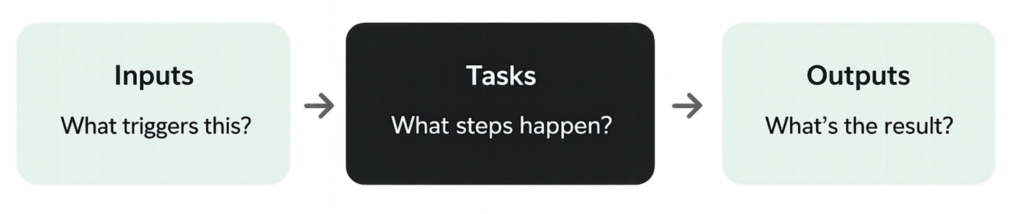
You don’t need special software for this. A simple flowchart tool (Miro, Lucidchart, even paper) or a written SOP (Standard Operating Procedure) document for each key process is enough to start. The goal isn’t a perfect diagram — it’s the act of writing it down. Because once you do, the inefficiencies that felt normal start to look strange.
As you map each workflow, look specifically for three red flags:
- Bottlenecks — steps where work consistently piles up, waiting on one person, one approval, or one piece of information.
- Redundant steps — tasks that are repeated unnecessarily or that duplicate work already done elsewhere in the process.
- Manual handoffs — moments where work is passed from one person to another via email, WhatsApp, or a sticky note, with nothing in the system tracking whether it actually happened.
These three signals are where your automation opportunities live. Mapping first means you’ll act on evidence, not assumptions. Skip this step, and you’re just guessing — which is how you end up automating the wrong things.
The Automation Signals Hidden in Your Daily Operations
Once you’ve mapped your workflows, you’ll start to recognise patterns. There are reliable, consistent indicators that a task is ready to be automated — we call these automation signals. Here’s what to look for:
- It happens daily or weekly without variation. If someone on your team does the same task on repeat — same steps, same outcome — it’s a candidate. Repetition is the first signal.
- Mistakes happen more than they should. Human error on rote tasks is natural, not a performance problem. Machines don’t get distracted or tired. If errors are costing you rework time, that’s a signal.
- Someone is copying and pasting data between systems. This is one of the clearest signals you’ll find. If information is being manually transferred from one platform to another, that’s almost always automatable.
- Approvals move slowly and predictably. If a sign-off follows the same rules every time — same criteria, same chain, same outcome — it can be routed automatically.
- Everything depends on one person. When a process stalls because one person is on leave, the process is fragile. Automation creates resilience by removing single points of failure.
One practical approach is to run a “time audit” for one week. Ask each team member to log how they spend their time in 30-minute blocks. The patterns you find will usually point directly to your highest-value opportunities.
How to Prioritise: Impact vs. Effort
Not every automation is worth doing, and that’s an important thing to accept early. Some will save hours per week; others will consume days of setup time to recover minutes per month. Before you commit to building anything, you need to prioritise — and the simplest way to do that is a 2×2 matrix.
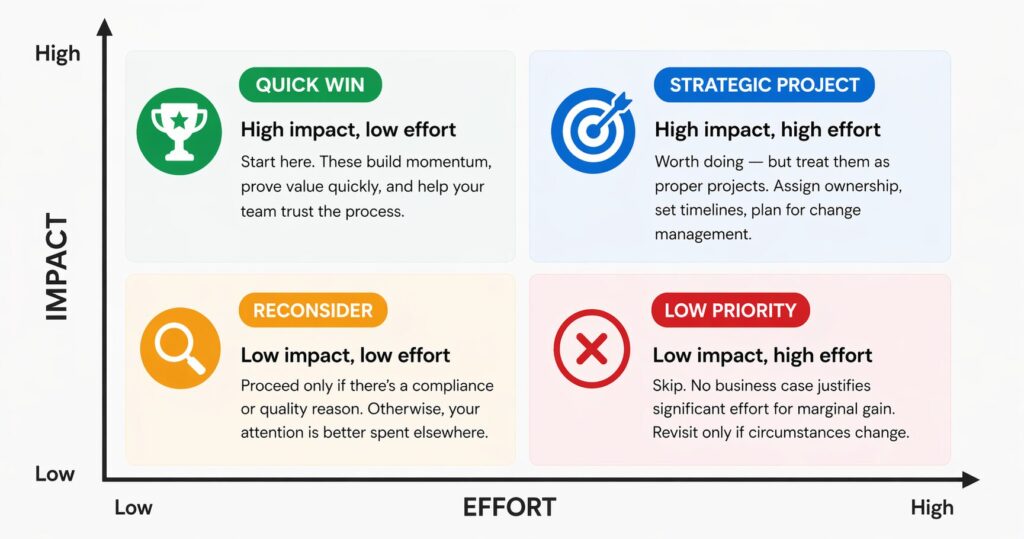
To score each opportunity, measure it against four things:
- Time saved — how many hours per week does this free up, and for which roles?
- Cost reduction — does it cut labour hours, reduce errors that require rework, or eliminate penalty costs from delays?
- Revenue impact — does faster processing lead to faster billing, fewer lost leads, or quicker delivery?
- Customer experience — does the customer get a faster, more consistent, more reliable response as a result?
Be guided by the numbers, not the frustration level. Sometimes the task your team hates the most is actually low-volume and low-impact — and automating it won’t move the needle much. Let the data lead. If you need a clearer starting point, this guide—How Malaysian SMEs Can Start AI Automation in 2026—offers a practical way to get started.
Where to Look: High-Value Areas Across Your Business
To make this more concrete, here’s a breakdown by department. These are the most common manual tasks we see across growing businesses — the ones that keep coming up in every audit we do. If you recognise something your team currently handles by hand, it’s worth a closer look.
- Marketing
- Lead capture and nurturing sequences
- Campaign performance reporting
- Social scheduling and publishing
- Sales
- CRM data entry and updates
- Follow-up reminders and emails
- Pipeline stage tracking and alerts
- Operations
- Order processing and fulfilment triggers
- Inventory threshold alerts
- Supplier communication workflows
- Finance
- Invoice generation and delivery
- Expense submission and approval
- Payment reconciliation alerts
- HR
- Employee onboarding task flows
- Leave management and approvals
- Payroll data collection
This isn’t an exhaustive list — it’s a starting point to help you recognise patterns in your own business. The specifics will vary, but the structure is almost always the same: repeatable tasks, manual data movement, and slow approvals sitting inside processes that could be largely automated.
Evaluate Your Readiness: Data, Tools, and Team
Identifying the right opportunity is only half the work. Before you build or buy anything, you need an honest read on whether your business is actually ready to implement it. Automation on a shaky foundation creates bigger problems than it solves — and fixing those problems later costs far more than getting the foundation right first.
Three questions worth sitting with before you move forward:
1. Is your data structured and accessible?
Automation depends on consistent, clean inputs. If your information lives in scattered spreadsheets, email threads, or someone’s memory, you need to address that before building anything on top of it.
2. Do your current tools play well together?
Check whether your existing software supports APIs or connects to automation platforms like Zapier, Make, or Power Automate. If your tools are siloed or outdated, you may need to sort out your infrastructure before you can automate effectively. This is also where the question of whether you actually need an ERP comes up.
3. Is your team ready to work differently?
Technology is the easy part. People are the hard part. Does your team understand why this change is happening? Do they trust the new process? Have they been involved in shaping it? Change management is not a nice-to-have — it’s what determines whether the automation actually gets used.
If you can’t check all three boxes yet, that’s okay — but it changes your sequencing. Data cleanup, tool consolidation, and team alignment are legitimate first steps, not delays. Getting them right is what makes the automation stick.
Start Small. Learn Fast. Then Scale.
The most common mistake in automation projects isn’t choosing the wrong tool — it’s choosing too large a scope. Teams try to transform everything at once, underestimate the complexity, and end up with a half-built system that nobody trusts and everyone works around.
The smarter approach is deliberately narrow. Constrain your first automation project to three things:
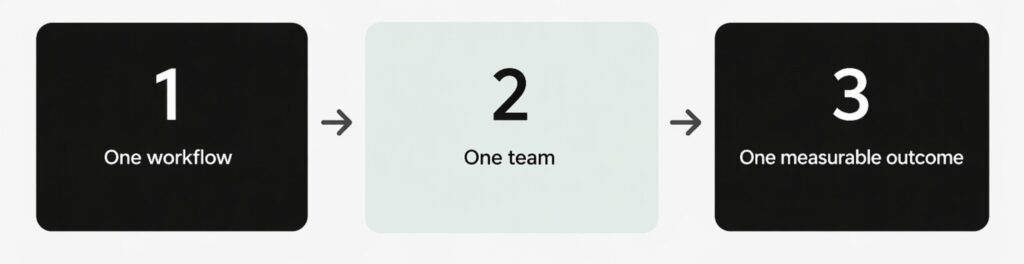
Before you start, define what success looks like — specifically. “Reduce the time our finance team spends on invoice generation from four hours per week to under 30 minutes” is a success metric. “Make things more efficient” is not.
Run your new automation in parallel with the manual process for the first few weeks. Compare outputs. Gather honest feedback from the people using it every day. Expect to adjust — not because something went wrong, but because real-world use always surfaces edge cases that planning can’t predict.
Once you have one working automation with measurable results and a team that trusts it, you have something more valuable than a workflow — you have proof. That proof is what builds internal momentum. Automation spreads through an organisation one successful win at a time, not through a top-down mandate.
Automation Is an Ongoing Practice, Not a One-Time Project
The businesses winning with automation right now aren’t necessarily the ones with the biggest budgets or the most sophisticated tools. They’re the ones that have built the habit of continuously looking at how they work — and consistently making it a little better.
There’s no finish line. No launch day where everything is finally automated and you move on. It’s an ongoing capability that compounds: every workflow you improve teaches you something that makes the next one easier to spot, faster to build, and smoother to roll out.
The path forward is straightforward: get clear on what you actually do, find the signals, prioritise what matters, start somewhere small, and iterate. Clarity first — then prioritisation, then execution. In that order.
Ready to Find Automation Wins in Your Business?
Most inefficiencies don’t look like problems at first. They show up as small delays, repeated tasks, or work that “just takes time.” Over time, they compound — quietly slowing your team down.
The challenge isn’t access to tools. It’s knowing where the real opportunities are.
If you’re not sure where to begin, start by looking closely at how work actually gets done today. Map one process. Identify where time is lost. Spot what repeats. That alone will usually reveal more than any platform or demo ever could.
For businesses that want a clearer starting point, this is where Flow Digital typically comes in. A structured automation audit helps surface what’s already happening beneath the surface — the bottlenecks, the manual work, the quick wins — so you can move forward with clarity instead of guesswork.
Because the goal isn’t to automate everything.
It’s to automate the right things — and build from there.
Frequently Asked Questions (FAQ)
01.What is AI automation and how does it work in business?
AI automation uses software and intelligent systems to handle repetitive tasks based on rules or data triggers, helping businesses reduce manual work and improve efficiency.
02.How can I identify AI automation opportunities in my company?
You can identify AI automation opportunities by mapping workflows, spotting repetitive tasks, and analysing where time is lost due to manual processes or delays.
03.What processes should I automate first in my business?
Start with high-impact, repetitive processes such as data entry, reporting, lead management, and approval workflows that consume time but follow predictable steps.
04.What are examples of AI automation for SMEs in Malaysia?
Common examples include automated invoicing, CRM updates, chatbot customer support, marketing email flows, and inventory tracking systems.
05.Is AI automation expensive for small businesses?
AI automation can be cost-effective if implemented strategically. Many tools offer scalable pricing, and starting with small, high-impact workflows helps maximise ROI.
06.Why do AI automation projects fail in businesses?
Most AI automation projects fail because businesses automate the wrong processes, lack clear workflows, or adopt tools without proper planning and data readiness.
07.What are the benefits of AI automation for business growth??
AI automation improves efficiency, reduces errors, lowers operational costs, speeds up processes, and allows teams to focus on higher-value work.
08.How do I prioritise which automation to implement first?
Use an impact vs effort approach—prioritise tasks that deliver the most value with the least complexity to achieve quick wins and build momentum.
09.Do I need technical skills to implement AI automation?
Not necessarily. Many modern AI automation tools are no-code or low-code, but having a clear process and strategy is more important than technical expertise.
10.How long does it take to implement AI automation?
Simple AI automation workflows can be implemented in days or weeks, while more complex systems may take longer depending on integration and business readiness.