
The news is out – AI is taking over the world!
At least, that’s what most people seem to believe. Since the release of ChatGPT in November 2022, the world seems to have started moving even faster than before. Applications for what started out as a mere chatbot evolved rapidly into multiple applications in the workplace, including copywriting, image generation, video production – and even UI and UX design.
While there are concerns that the introduction of artificial intelligence will spell doom for creative roles such as user interface design and user experience design, there may be more ways it can be supported than it could destroy it. What’s more, as the digital landscape continues to evolve throughout Malaysia, we could be seeing a new mass adoption of UI and UX design practices into industry as businesses continue to compete with each other.
In this article, we will review what is UI and UX, explore the concept of AI in UI and UX design and the effect and steps to adopting UI and UX design into the Malaysian workplace.
What Is User Interface (UI) Design?
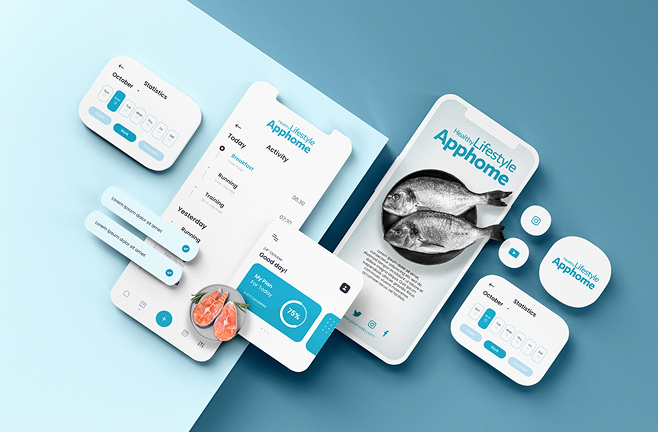
UI (User Interface) design is the visual and interactive foundation of any digital product. It’s what users actually see, click, tap, and experience directly when they visit your website, use an app, or interact with a digital service. In essence, UI design transforms functional frameworks into visually engaging and intuitive environments that guide users effortlessly through their journey.
At its core, UI design focuses on creating interfaces that are both aesthetically pleasing and highly functional. A good UI designer ensures that every colour, font, icon, and button is thoughtfully placed to make interactions intuitive and enjoyable. The goal is to help users navigate seamlessly, complete actions easily, and feel confident while engaging with the platform. Let’s explore the main components that make UI design so impactful:
1. Colour Schemes
Colours influence how users feel and interact with a website. Consistent colour palettes strengthen brand identity and improve readability.
2. Buttons and Interactions
Buttons, sliders, and other interactive elements should be clearly visible and easy to use. Well-placed buttons help guide users toward key actions like signing up or purchasing.
3. Typography and Icons
Readable fonts and simple icons make content easier to understand. Clear text and recognisable symbols improve navigation and communication.
4. Layout and Hierarchy
A clean layout helps users find what they need quickly. Using spacing, contrast, and size draws attention to important content or calls to action.
5. Responsive Design
Websites should look and work well on all devices. Responsive design ensures that content automatically adjusts to different screen sizes.
6. Overall Look and Feel
Good UI design creates a strong first impression. Clean visuals, smooth animations, and consistent branding make users enjoy the experience and trust the brand.
What Is User Experience Design?
UX (User Experience) design takes a broader, more strategic view of how users interact with a product or platform. It’s not just about how things look, but how they work — the flow, logic, and satisfaction users feel when navigating through a website or app. A good UX design ensures every interaction is intuitive, efficient, and meaningful, allowing users to achieve their goals effortlessly.
At its core, UX design focuses on understanding why users behave the way they do, and translating those insights into a product that feels natural to use. UX designers analyse, plan, and test every touchpoint to remove friction, prevent confusion, and enhance engagement. Here’s a closer look at the key elements of UX design:
1. User Research
Understand your users’ needs, goals, and challenges through surveys, interviews, or analytics. This helps design experiences that solve real problems.
2. Information Architecture
Organise content in a clear, structured way so users can easily find what they’re looking for without confusion.
3. User Flows
Map out the steps users take to achieve their goals. A clear flow helps users complete actions quickly, like buying a product or filling out a form.
4. Usability Testing
Test your design with real users before launch. Identify pain points, fix issues, and improve the overall experience based on feedback.
5. Accessibility
Make sure your website is usable by everyone, including people with disabilities. This includes readable fonts, alt text for images, and easy navigation.
6. Continuous Improvement
UX design doesn’t stop after launch. Regularly collect feedback, analyse data, and make updates to keep improving the user experience.
The Key Differences Between UI & UX Design
To tell the difference between UI and UX, you can look into their focus and deliverables.
Focus – UI design prioritises visuals and interface usability, while UX design takes a broader view of the user’s entire journey.
Deliverables – UI designers create visual assets such as wireframes and prototypes for the digital product, while UX designers focus on user research and how to optimise digital platforms for the best experience.
While the differences between UI and UX are clear, they work best together when creating a platform. Imagine a beautifully designed website (UI) that’s confusing to navigate (poor UX). It wouldn’t be a success. Here’s how they work together:
1. UX Informs UI
UX research helps to inform UI design decisions. For example, a user flow analysis might reveal a need for an eye-catching search bar, which the UI designer needs to add to the prototype.
2. UI Enhances UX
A well-designed interface with clear visuals and intuitive interactions in turn improves the user experience. Improved user experience equals a better chance to get visitors to do what you want.
3. Continuous Improvement
Both UI and UX designers work iteratively. UI mockups are tested with users, and feedback is incorporated to refine both the UI and UX. Over time as more areas of improvement are flagged by users, UX will identify them and pass them on to the UI designers for enhancement.
Essentially, UI and UX design are like two sides of a coin. While they have their differences, they work together to create user-centred websites and applications that are aesthetic, functional and can lead to conversions.
Now that we have an understanding of UI and UX and their differences, we can explore how the introduction of artificial intelligence tools can affect the way designers work.
Read More: Purpose of UIUX Design and How It Increases Conversions
Why Should You Adopt AI in UI/UX Design?
According to global surveys, around 77% of companies across the globe are already using or exploring AI integration in their workflows, with 44% of businesses reporting significant productivity gains through automation and 81% of employees saying AI tools have helped improve their performance.
Rather than fearing the technology, UI and UX designers as well as businesses should embrace AI as a creative partner that enhances efficiency, accelerates innovation, and elevates user experience. The faster organisations integrate AI into their design and development processes, the more adaptive, data-driven, and user-centric their digital presence becomes. In Malaysia’s rapidly evolving digital economy, early adopters of AI-powered UI/UX practices will gain a decisive competitive edge, setting new standards in usability, creativity, and customer engagement.
How AI Is Transforming UI and UX Design
Artificial Intelligence (AI) has become one of the most transformative forces in the modern design process. Since its mainstream introduction, AI has not replaced designers — it has redefined how they work. Instead of being a competitor, AI acts as a creative co-designer, providing data-driven insights, automating repetitive tasks, and helping UI/UX professionals focus more on creativity, strategy, and innovation.
Today’s AI-powered design tools have the capability to analyse user behaviour, generate ideas in seconds, and even predict design outcomes before implementation. This integration is revolutionising how websites and apps are conceptualised, built, and optimised for users.
Let’s explore the major ways AI is changing the landscape of UI and UX design:
AI-Powered Design and Intelligent Automation
Traditional design workflows often require hours of brainstorming, wireframing, and prototyping. AI tools like ChatGPT, Figma AI, Adobe Firefly, and Uizard have significantly streamlined this process by automating the early phases of design ideation and layout generation.
AI can now:
Generate layout suggestions and UI elements based on a few keywords or wireframe sketches.
Recommend design improvements aligned with best UX practices and accessibility standards.
Automate repetitive tasks such as resizing, spacing adjustments, or component labelling, saving valuable hours.
Generate dummy content for prototypes, such as placeholder copy or images, to help designers visualise real-world scenarios.
This automation allows designers to focus on the creative and strategic aspects of user experience — rather than getting bogged down by manual tasks.
Smarter Colour Palette Generation
Colours are the foundation of visual identity and play a major role in brand consistency. In the past, designers relied heavily on intuition or manual colour theory research. Now, AI tools like Coolors, Khroma, and Adobe Color AI use machine learning to generate perfect colour combinations tailored to a brand’s tone, industry, and target audience.
For example, a Malaysian fintech company can input keywords like trust, innovation, and security — and AI will instantly suggest combinations of blues and teals, colours proven to evoke reliability and stability. This not only speeds up design workflows but also ensures every colour choice aligns with psychological and branding principles.
3. AI-Generated Microinteractions and Motion Design
Modern users expect more than static pages — they crave movement, responsiveness, and interactivity. AI has started to play a major role in crafting microinteractions, such as buttons that animate on hover or icons that react when clicked.
AI-based tools can now:
Automatically generate CSS or JavaScript snippets to implement animations.
Suggest motion effects based on a user’s navigation behaviour.
Optimise these animations to load smoothly across all devices, reducing lag and maintaining performance.
For example, an eCommerce site can use AI-generated animations to make “Add to Cart” buttons pulse subtly when hovered, catching the user’s attention and increasing conversion rates — all while keeping performance optimised.
Essentially, UI and UX design are like two sides of a coin. While they have their differences, they work together to create user-centred websites and applications that are aesthetic, functional and can lead to conversions.
Now that we have an understanding of UI and UX and their differences, we can explore how the introduction of artificial intelligence tools can affect the way designers work.
Read More: Purpose of UIUX Design and How It Increases Conversions
4. Personalised User Experiences Through Predictive AI
AI’s biggest impact in UX design lies in personalisation. Using behavioural data, AI can dynamically tailor a user’s experience in real time. This concept, known as hyper-personalisation, ensures that every visitor interacts with a version of your website or app that feels built just for them.
Here’s how AI personalisation works in practice:
Product Recommendations: AI analyses a user’s browsing history to display relevant products or services. (Think of how Lazada or Shopee surfaces items based on past searches.)
Dynamic Content Layouts: AI algorithms adjust on-screen layouts to highlight the most relevant information for each user.
Conversational AI & Chatbots: Tools like Drift or Intercom AI create human-like, real-time conversations with users, providing support or guidance in a tone that matches your brand.
This kind of personalisation creates a strong sense of connection and convenience, which is crucial in Malaysia’s competitive digital economy where user attention spans are shorter than ever.
5. Data-Driven UX Research and Predictive Analysis
Perhaps the most game-changing role of AI in UX design is in data analysis and usability testing. Traditionally, gathering user insights required multiple testing rounds, focus groups, and long evaluation periods. With AI, designers can now access these insights in real-time.
AI tools such as Attention Insight, Hotjar AI, and Crazy Egg can:
Generate predictive heatmaps that show where users are most likely to focus or click.
Conduct automated A/B testing, comparing different design variations simultaneously to find which performs best.
Use sentiment analysis to understand how users emotionally respond to your website or app’s design and content.
For example, before launching a website redesign, AI can simulate thousands of user interactions and provide instant feedback on potential problem areas — such as confusing buttons, distracting colours, or weak calls-to-action. This allows companies to make improvements before the site goes live, saving time and development costs.
The Rise of UI UX Design in Malaysia
- Increasing website conversions and sales.
- Improving customer satisfaction and brand loyalty.
- Reducing support costs through user-friendly interactions.
Understanding UI UX Design Costs in Malaysia
However, we know that UI UX design can be a new area of digital transformation which businesses and owners may not know about, including how much to spend on a UI UX project.
There are a few factors which you should consider that will affect your costs, including:
- Project complexity – Are you starting out with a brand new platform or revamping an existing one? Is your website a simple landing page or an ecommerce website with lots of products?
- Location – Are you hiring a UI/UX designer locally or internationally? How do their rates compare?
- Experience – Do they have a portfolio that justifies their costs? What other clients have they worked with
- Project timeline – How soon do you need to have your update platform running? Typically, the sooner it is, the more expensive it is.
Read More: UI Web Design – How Much Does It REALLY Cost in Malaysia (2024 Guide)
Should You Hire a Freelancer or a Digital Agency?
With a diverse range of talents in Malaysia, you may be spoiled for choice with selecting the right one for your project. But a major consideration is whether to hire a freelancer or digital agency.
Freelancers often provide cost-effective solutions with flexible arrangements and specialised skills. However, project management and ensuring freelancer experience and availability will likely affect your timeline and how long it could take to achieve the final product.
Agencies can offer multi-service solutions, teamwork, established processes and industry expertise. What’s more, they could have a dedicated team to look after your project, but they usually come at a higher cost too.
Before hiring, you should review what your shortlisted UI/UX designers can bring to the table during the consultation period.
- What have they listed down as their strengths and skills?
- Who have they worked with before?
- How much are they charging per project?
Asking your targeted designers these questions will help you hone down your choices and make it easier for you to make a decision.
In summary, consider your project requirements, your available budget and level of customisation to help you make an informed decision. Learn more on how to select the right freelancer or agency for your website here.
Should You Adopt AI-Related UI UX Design?
The short answer: yes, you should.
With how much user experience is evolving with the introduction of AI tools, people’s expectations of digital platforms will evolve alongside it. As people’s standards of using websites or other platforms change, it will impact brand perception in the long run. Keeping up with current UI and UX trends on your website or platform can help your online identity stay more relevant to the internet surfers of today.
So, what do you need to get started? Getting a consultation by a UI UX design expert can help you get started by identifying the areas which need work to improve user experience.
If you’d like, get in touch with Flow Digital Team to start a discussion.